ZetaRank TrackNotify Pro — Automated Shipment Tracking & Notifications for WooCommerce
What this product does.
ZetaRank TrackNotify Pro
Automated Shipment Tracking & Customer Notifications for WooCommerce
ZetaRank TrackNotify Pro helps WooCommerce stores automate shipment tracking and keep customers informed without manually entering tracking details for every order.
When your shipping platform sends tracking information back to WooCommerce, TrackNotify Pro can automatically detect the shipment, identify the carrier and service, store the tracking information, and notify the customer using your preferred notification method.
It is designed for stores that want a reliable shipment-tracking workflow without relying on manual order updates.
Automate Your Tracking Workflow
With supported shipping integrations such as ShipStation, tracking information can flow automatically back into WooCommerce.
Your workflow can become:
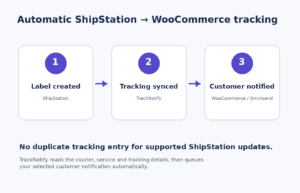
Customer Order → Shipping Label Created → Tracking Returned to WooCommerce → TrackNotify Detects Shipment → Customer Receives Tracking Information
No repeated copying and pasting of tracking numbers into individual orders.
Key Features
Automatic Shipment Tracking
Automatically capture tracking information returned by supported shipping platforms.
TrackNotify can store and display:
- Tracking number
- Tracking URL
- Shipping carrier
- Delivery service
- Shipment date
- Current shipment status
- Estimated delivery information
ShipStation Integration
TrackNotify Pro can work with ShipStation shipment updates sent back to WooCommerce.
When a shipping label is created and tracking information is returned, TrackNotify can automatically process the shipment and prepare the customer notification.
Customer Tracking Emails
Send professional WooCommerce tracking emails as soon as shipment information becomes available.
Customers can see:
- Shipping provider
- Shipping service
- Tracking number
- Tracking button
- Shipment information
Email templates can be customized from WooCommerce settings.
Omnisend Integration
Connect TrackNotify Pro with Omnisend and trigger shipment-related automation events.
You can use Omnisend for branded shipping notifications while TrackNotify handles the tracking information behind the scenes.
SMS & WhatsApp Notifications
Send shipment updates using supported Twilio integrations.
Notify customers about:
- Shipment creation
- Tracking availability
- In-transit updates
- Out-for-delivery status
- Delivery confirmation
- Shipment exceptions
Customer consent controls are included.
Live Shipment Status Tracking
Connect EasyPost to monitor shipment status after the tracking number has been created.
Supported shipment events can include:
- Pre-transit
- In transit
- Out for delivery
- Delivered
- Failed delivery
- Exception
- Returned
Multiple Packages Per Order
TrackNotify Pro supports orders shipped in multiple packages.
Each package can have its own:
- Tracking number
- Carrier
- Shipping service
- Tracking URL
- Shipment status
This is especially useful when products from the same WooCommerce order are shipped separately.
Partial Shipment Support
Assign specific order items or quantities to individual shipments.
Customers can clearly understand which products have shipped and which items are still waiting to be fulfilled.
Customer Tracking Portal
Provide customers with a mobile-friendly shipment tracking page.
Customers can view their shipment information from their WooCommerce account or through secure tracking links.
Automatic Carrier Identification
TrackNotify can identify supported carriers and generate appropriate tracking links when possible.
Customers see the actual delivery provider such as:
USPS — Priority Mail
instead of only seeing the shipping software used to create the label.
Duplicate Notification Protection
TrackNotify includes safeguards designed to prevent customers from receiving the same tracking notification repeatedly.
Repeated shipment updates can be recognized without generating unnecessary customer emails.
Shipment Corrections
If tracking information changes, administrators can correct the shipment without creating duplicate records.
Updated notifications can also be sent when required.
CSV Import & Export
Import shipment information in bulk or export tracking records for reporting and migration.
Bulk imports include validation and row-level error handling.
REST API
Developers and external applications can create and update shipment tracking information through authenticated REST API endpoints.
This makes TrackNotify suitable for custom fulfillment systems and third-party logistics workflows.
Notification History
Track customer shipment notifications directly from WooCommerce.
Administrators can review:
- Notification status
- Notification method
- Previous attempts
- Errors
- Retry information
- Shipment events
WooCommerce HPOS Compatible
TrackNotify Pro is designed to work with WooCommerce High-Performance Order Storage and uses WooCommerce order APIs rather than depending on legacy order storage.
Built for Automation
TrackNotify Pro is designed to reduce repetitive order-management work.
Instead of opening every WooCommerce order and manually adding tracking information, supported shipping services can send tracking data automatically.
TrackNotify then handles the customer-facing tracking workflow.
Flexible Notification Options
Choose how customers receive shipment information:
- WooCommerce email
- Omnisend automation
- SMS
You can configure your store so only one system sends a particular shipping notification, helping avoid duplicate customer emails.
Works With Manual Shipments Too
Not every shipment comes from an automated shipping platform.
TrackNotify Pro still allows administrators to manually add or correct tracking information when necessary.
Manual controls include:
- Save shipment
- Save without notification
- Save and notify
- Resend notification
- Correct tracking information
Designed for Growing WooCommerce Stores
TrackNotify Pro is suitable for:
- Online stores
- High-volume WooCommerce stores
- Subscription businesses
- Fulfillment operations
- Multi-package orders
- Stores using ShipStation
- Stores using Omnisend
- Businesses wanting SMS or WhatsApp shipment updates
- Stores requiring API-based fulfillment integrations
Stop Entering Tracking Information Twice
Your shipping platform already knows the tracking number.
TrackNotify Pro helps WooCommerce use that information automatically and turn it into a better customer experience.
Automate tracking. Keep customers informed.
License
ZetaRank TrackNotify Pro includes a commercial license with activation through ZetaRank.
License options can support:
- Annual licensing
- Site activation limits
- License renewal
- Secure plugin updates
- Automatic update notifications
Get ZetaRank TrackNotify Pro and automate your WooCommerce shipment tracking workflow.
Downloadable product.
Purchase access and downloadable files are handled through your WooCommerce order.